
Mico - Widget & Live Wallpaper
MICO LTDPersonalization
4.2886.00 Reviews
- Version
- 1.69.1
- Installs
- 10.00M
- Age Rating
- Everyone
Screenshots
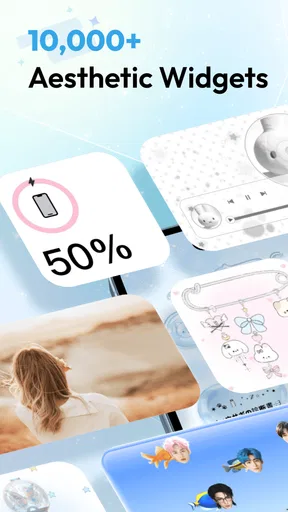
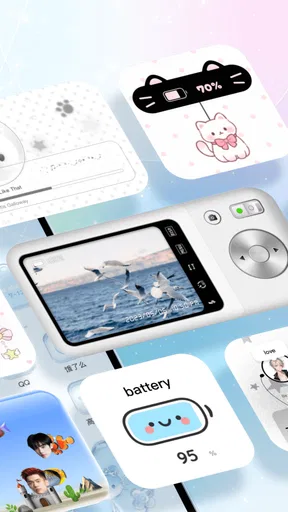
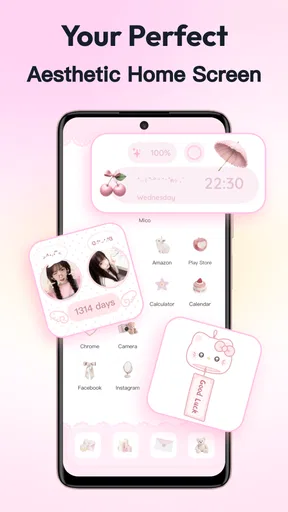
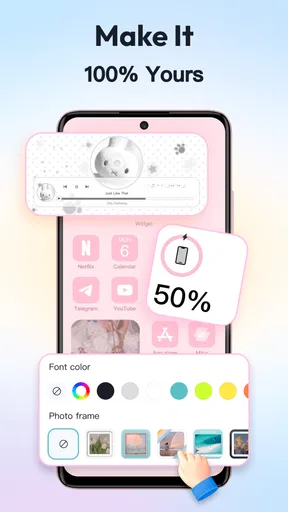
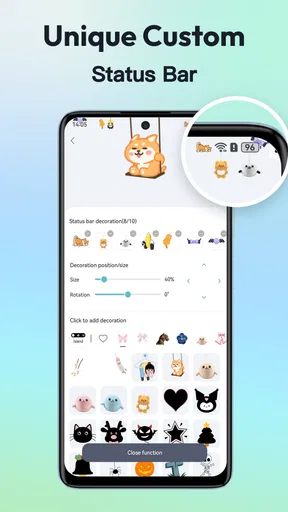

Our Review of Mico - Widget & Live Wallpaper
 Analysis by Appyee
Ever felt like your home screen needed a little extra pizzazz? I was in the same boat until I stumbled upon Mico - Widget & Live Wallpaper. This nifty app quickly became my go-to for jazzing up my phone with some visual flair. Let me take you through my experience with it.
Getting Started with Mico
Diving into Mico - Widget & Live Wallpaper was like opening a treasure chest of customization options. The app’s interface is sleek, making it super easy to navigate. You don’t need to be a tech wizard to figure it out, and I appreciated that. From the get-go, you can tell a lot of thought went into making this user-friendly.
The app lets you choose from a wide variety of live wallpapers and widgets, designed to suit any mood or aesthetic. Feeling a bit whimsical? There’s a wallpaper for that. Want something more minimalist? You’ve got options there too. It’s like having a personal stylist for your phone.
Widgets Galore
Now, let’s talk widgets. I’m a sucker for functionality, and Mico delivers in spades. The app offers a range of widgets that are not only eye-catching but also incredibly useful. You can personalize your clock, calendar, and even weather widgets. I found the calendar widget particularly handy; it syncs seamlessly with my schedule, helping me keep track of my day at a glance.
Another cool feature is the ability to customize the size and style of these widgets. Want a bold color to pop out or a subtle pastel to blend in? Mico’s got you covered. It’s the little things that make a big difference, and this app definitely understands that.
Live Wallpapers: Bringing Your Screen to Life
As for the live wallpapers, they are simply mesmerizing. The animations are smooth, and they don’t feel like they’re going to drain your battery in a heartbeat. I was particularly impressed by how the app manages to keep everything running efficiently without compromising on visual quality.
You can switch between different themes effortlessly. One day I’m floating through a serene landscape, and the next, I’m exploring a bustling cityscape. It’s like changing the curtains in your room; it freshens everything up.
Customization and Creativity
One of the standout features is the level of customization Mico offers. You can really let your creativity run wild here. The app provides the tools to tweak almost every aspect of your widgets and wallpapers. It’s like having a blank canvas where you can paint whatever you like, and trust me, it’s addictive!
For those who love a bit of DIY, Mico allows you to create your own widgets. This was a game-changer for me. I spent hours tweaking and perfecting my clock widget until it was just right. There’s something quite satisfying about making your phone truly yours.
Final Thoughts
All in all, Mico - Widget & Live Wallpaper is a fantastic app for anyone looking to add a splash of personality to their phone. It’s fun, functional, and incredibly versatile. Whether you’re a customization newbie or a seasoned pro, Mico has something for everyone.
So, if you’re on the hunt for a way to spruce up your home screen, give Mico a shot. You won’t be disappointed. It’s like having a little piece of art in your pocket, ready to brighten your day whenever you need it.
Privacy and Permissions
See what permissions an app requests and how it handles your data.
- Location
- approximate location (network-based), precise location (GPS and network-based)
- Phone
- read phone status and identity
- Photos/Media/Files
- read the contents of your USB storage, modify or delete the contents of your USB storage
- Storage
- read the contents of your USB storage, modify or delete the contents of your USB storage
- Camera
- take pictures and videos
- Wi-Fi connection information
- view Wi-Fi connections
- Device ID & call information
- read phone status and identity
- Other
- view network connections, pair with Bluetooth devices, access Bluetooth settings, connect and disconnect from Wi-Fi, control flashlight, full network access, set wallpaper, draw over other apps, control vibration, prevent device from sleeping, modify system settings, Google Play license check
Verdict
Strengths of Mico - Widget & Live Wallpaper
- Customizable widgets enhance home screen aesthetics.
- Live wallpapers are dynamic and eye-catching.
- User-friendly interface makes customization easy.
- Regular updates with new themes and features.
- Low battery consumption despite live features.
Limitations of Mico - Widget & Live Wallpaper
- Limited free themes; most are paid.
- In-app ads can be intrusive at times.
- Some widgets require premium access.
- Occasional glitches with certain live wallpapers.
- Limited support for older device models.
Similar Picks in This Category
View All
Microsoft SwiftKey AI Keyboard
SwiftKey4.3

Wallpapers
Google LLC4.1

Zedge™ Wallpapers & Ringtones
Zedge4.7

Yandex Browser with Alice AI
Direct Cursus Computer Systems Trading LLC4.3

Ringtone Maker:create ringtone
Big Bang Inc.4.7

Fonts Keyboard
Fonts Keyboard3.9
Frequently Asked Questions
What features does Mico - Widget & Live Wallpaper offer?
Mico provides a wide range of customizable widgets and live wallpapers that can enhance your device's aesthetic. From dynamic wallpapers that change with your location or time of day to widgets that display weather, calendar events, or motivational quotes, Mico offers personalization options to suit any style.
Is Mico compatible with all Android and iOS devices?
Mico is designed to work on most Android and iOS devices. However, for optimal performance, it is recommended to check the app's compatibility with your device's operating system version. Regular updates ensure the app stays compatible with newer devices and OS versions.
Does Mico - Widget & Live Wallpaper consume a lot of battery?
While live wallpapers and widgets can affect battery life, Mico is optimized to minimize battery consumption. The app uses efficient algorithms to ensure that the impact on your device’s battery is minimal, allowing you to enjoy dynamic visuals without significant power drain.
Can I customize the widgets and live wallpapers in Mico?
Yes, Mico allows extensive customization of widgets and live wallpapers. Users can select from a variety of themes, colors, and styles to match their personal preferences. The app also allows you to create unique combinations, making your device truly personalized.
Is there a cost associated with using Mico - Widget & Live Wallpaper?
Mico offers a free version with basic features, but for full access to all customization options and premium content, a subscription or one-time purchase may be required. This helps support ongoing development and ensures a high-quality user experience.
